
Global Negation
May 12, 2025 7 min read Sebastian Eduard

Relevancy Screening, Cross-Campaign Alignment, and Smarter Ad Spend Protection
Fact: nobody has ever achieved 100% perfect negation in Amazon Ads, including software. While negation is fundamentally a simple concept, managing thousands of search terms generated daily across multiple campaigns makes it complex. We will not tackle the first stage of negation, the basic negation understood as clicks/spend threshold at set time intervals, but instead, explore four in-depth tactics that we have been perfecting for over 7 years. By the end of this article, you will learn that Global Negation® doesn't just aim to remove a low-performing search term from a research campaign; it also ensures relevancy, synchronicity across sister campaigns, and future protection against wasted ad spend.
1. Relevancy check
Problem Allowing irrelevant search terms to continue spending, even if they only have one click.
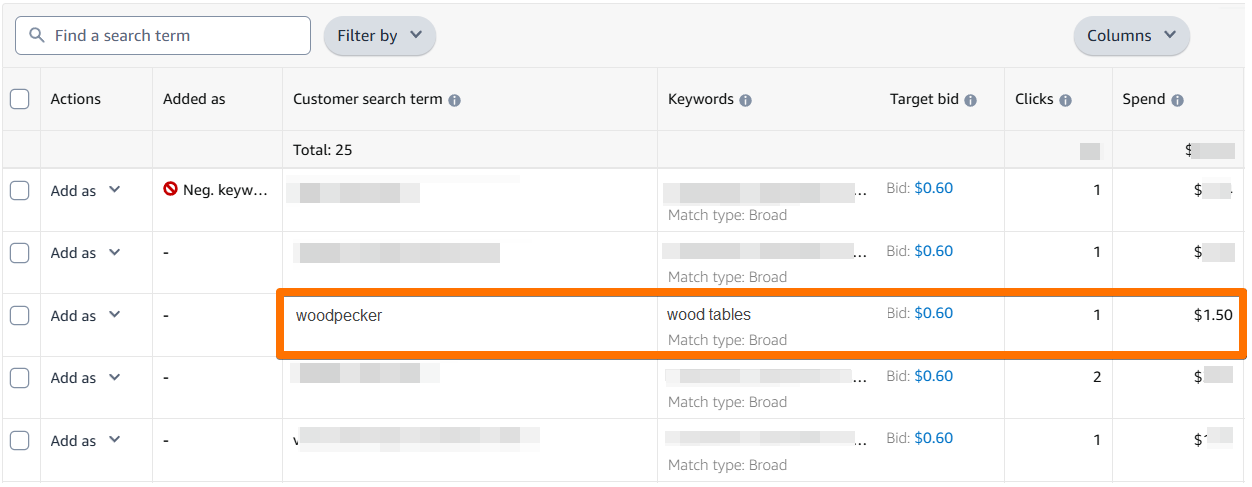
Example Imagine this: you are targeting "wood tables" inside a broad or auto campaign, and one of the resulting search terms is "woodpecker" with 1 click. How many orders do you think this search term will generate until it reaches your average 10-click threshold? Correct, zero! Why would you even allow it one more click? You wouldn't, except everybody does. Browse through your research campaigns, and we guarantee you will find at least one irrelevant search term with multiple wasted clicks in less than 5 minutes.
Solution
- a) Run your normal negation threshold schedule.
- b) For each research campaign, open Search terms and quickly evaluate each term by asking yourself: "Would a customer who searches for 'X' have my product in mind?" Common sense goes a long way here. When the answer is "no", negate exact.
- c) When in doubt, search it on Amazon to make sure it is relevant. Deciding Y/N might be complicated for a heterogeneous term, so we recommend this filter: the majority of results should be your product or a variation of it.
After running steps b) & c) as presented above, few to no irrelevant search terms will ever generate wasted ad spend.
2. Negative roots
Problem Allowing search terms belonging to an identical root word family to consistently yield negative results.
Example Continuing our "wood tables" example, we now notice that multiple search terms containing an identical root word, such as "woodpecker", are constantly underperforming and have been negated. No "woodpecker" variation will ever convert, be it "woody woodpecker", "green woodpecker" or "woodpecker toy". Knowing this, we never want our research campaigns to explore any "woodpecker" variation ever again.
Solution
- a) Download a bulk report and filter negated keywords for each ASIN/Portfolio.
- b) If you are not proficient in bulk files or your PPC campaign naming structure isn't curated, simply go to your ASIN/Portfolio research campaigns, and from inside each ad group you will find "Negative targeting" that you can export.
- c) ASIN/Portfolio > Campaign > Ad group > Negative targeting > Export.
- d) Merge the exports into a single file.
- e) Sort A to Z the negative keywords column.
- f) Find clusters of negated keywords that have the same root word. Alternatively you can use a free keyword processor to identify repetitive root words.
- g) Ensure that none of these words are relevant to your product by following steps 1. b) & c).
- h) Add these single words as "negative phrase".
3. Cross-campaign negation
Problem Allowing search terms that are already negated in one campaign to continue running in other campaigns for the same ASIN.
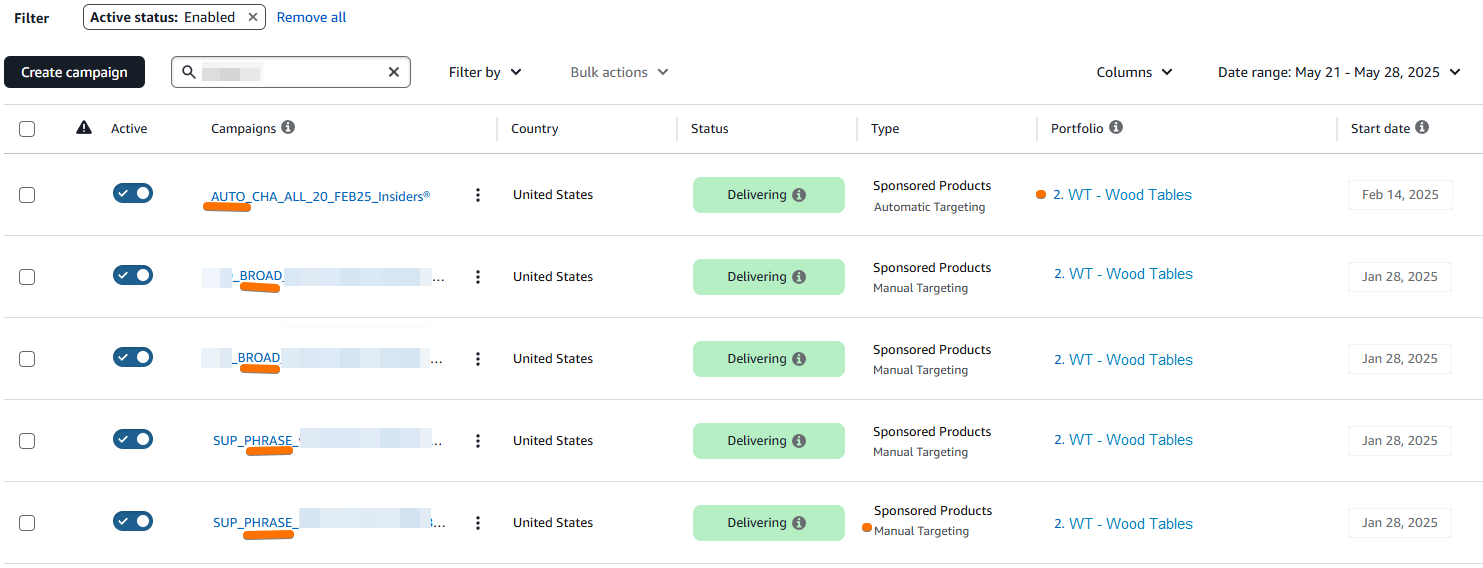
Example Say we have a mix of five research campaigns for our "wood table". During the negation process, one of the campaigns targets "woodpecker toy", which we rightly negate due to low performance. But what about the other four remaining campaigns? Are we just waiting for them to target the same search term "woodpecker toy" before negating it there as well? That would be leaving money on the table.
Solution Here's a simple system for long-term management:
- a) Organize a file called "Global Negation", with a sheet for each parent ASIN.
- b) Each file should contain four columns: Negative Exact, Found through normal threshold and interval negation. Negative Phrase, Found through Negative roots. Non-Relevant (ne*), Found through Relevancy check. ASINs (ne*), Generated by product targeting & auto campaigns, to be negated only there. *For simplicity of implementation, we will stop at these four categories.
- c) After every negation session, paste the results into their proper column in your parent ASIN's sheet.
- d) Paste the first three columns in all live research campaigns, and the ASINs (as Negative Exact) in all product targeting & auto campaigns. Most keywords will already be negated, but Amazon prevents duplications, keeping things simple. (*ne = negative exact)
4. Defensive Negation
Problem Allowing keywords already negated in existing campaigns to continue running in newly created ones.
Example Our "wood table" has now cross-campaign negated "woodpecker," ensuring no further variations can create wasted ad spend. But what about newly created campaigns? Should we learn for the 6th time that "woodpecker" doesn't convert for our "wood table"?

Solution Whenever you create a new research or product targeting campaign, start by loading it up with relevant negatives from the Global Negation file. This way, you're leveraging all the insights gained from existing research campaigns.
Conclusion
You now know what less than 1% of Amazon sellers do regarding negation. Negation is not only about placing a preset overlay on all search terms but taking a more holistic approach across each parent ASIN's negation landscape. The basic negation, understood as clicks/spend threshold at set time intervals, is just step one of a more complex process.
Only after running a Relevancy Check, implementing Negative Roots, deploying our findings through Cross-Campaign Negation, and insulating against future waste through Defensive Negation, can we say that our Global Negation system is complete.
Watch the Full Presentation

Sebastian Eduard
With over a decade of experience as an Amazon Seller and a consultant at heart, my mission through Insiders® is to deliver outstanding Amazon PPC Management, built on the respect and transparency I once sought during my own seller journey. The 50+ brands that entrusted us with +$65M Ad Spend, received $280M in Ad Sales and +$585M Total Revenue.